

Arduino 1.6.6 的新功能就是 Serial plotter,可以把數值直接顯示成圖表了,QQ。這個功能讓好多玩家望穿秋水啊,不然要做資料視覺化只能使外部程式例如 Processing 或 python 進行後續處理。
今天就來玩玩看吧,以下是使用 Serial plotter 繪製一元二次函式圖形的結果,很棒吧
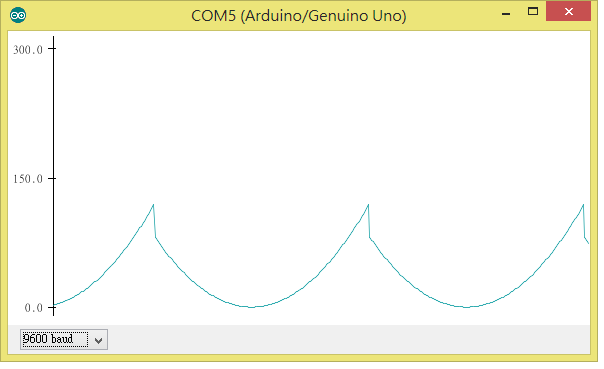
可看到語法一樣是 Serial.println(),只是要用Serial plotter 才能看到畫面。
實際測試的狀況下如果同時用 Serial.print 顯示字串的話,Serial plotter 會沒有畫面,另一方面,Serial monitor 與 Serial plotter 無法同時開啟,請注意喔

// please open serial potter to see the sine wave~
#include "math.h"

void setup() {
  Serial.begin(9600);
}

void loop() {
  for (double i = -10.0; i <= 10.0 ; i += 0.1) {
    Serial.println(pow(i, 2) + 2 * i + 1);
    delay(10);
  }
}延伸閱讀:Arduino 軟體更新,命令列工具與序列資料繪圖器新登場


