[App Inventor教學] Tinydb - 寫入姓名學號電話
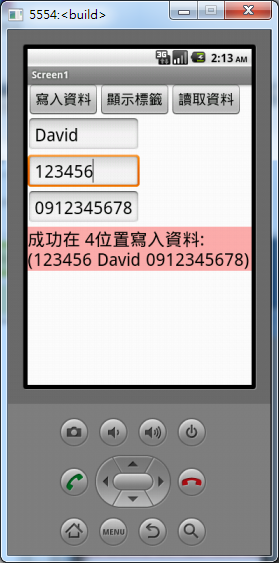
本範例是介紹 App Inventor 中的本機端資料庫元件 TinyDB,相當於 Android 的 SQLite,只是功能很陽春而已。請如下圖來配置畫面,一共用到 2個Button,一個 ListPicker(讀取資料),3個 TextBox 以及一個 Label。當然啦,還有最重要的 TinyDB。
範例程式碼請由此頁面下載。

按下[寫入資料]按鈕時,會把三個 TextBox 的內容組合成一個 list 後寫入資料庫,並在 Label 上顯示寫入成功的訊息。如下圖


本文發表於MIT App Inventor,並標記MIT App Inventor、程式教學。
留言 💬 (0)
還沒有留言,來當第一個。